
What is Data Ingestion? Definition, Types & Examples
Data ingestion is how data moves from sources to storage. Learn the definition, batch vs streaming types, real examples, and which tools to use.

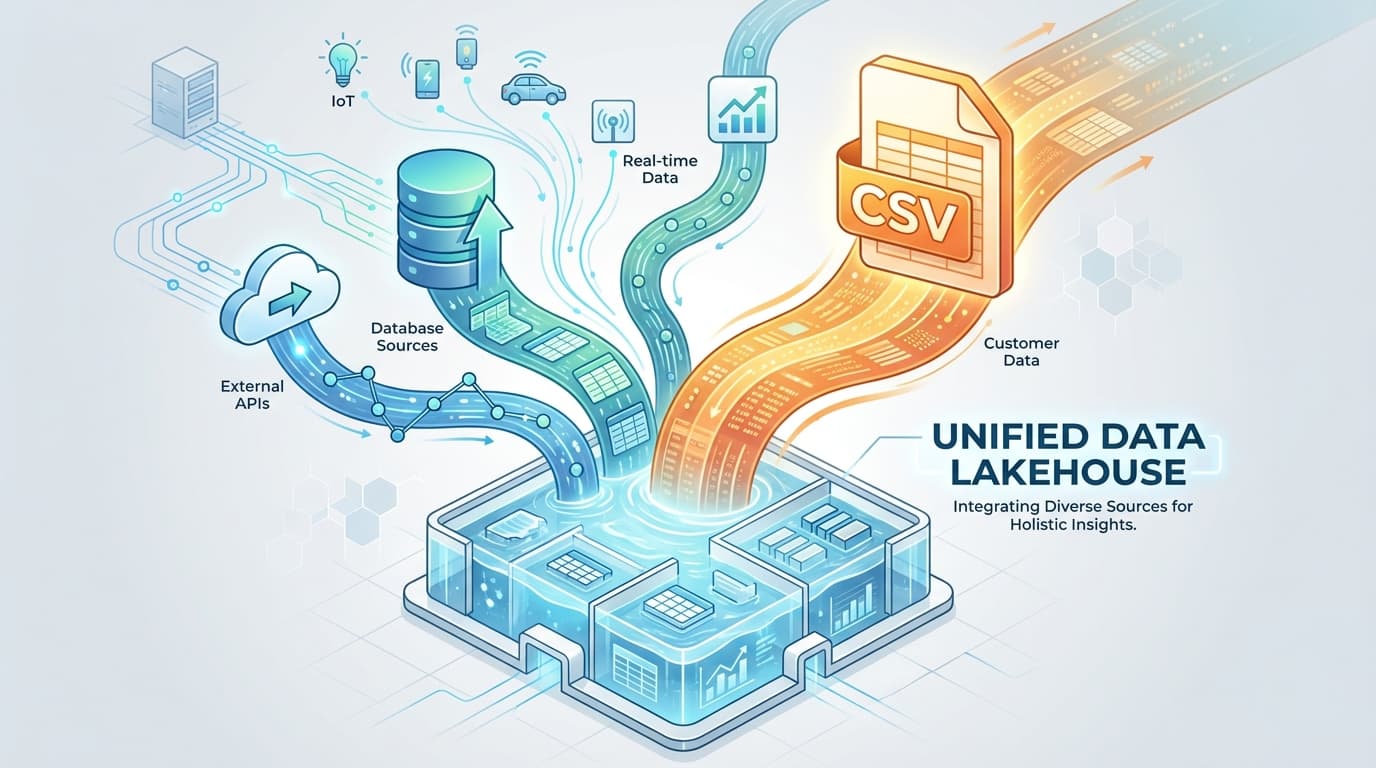
Data ingestion is the process of collecting data from multiple sources and moving it to a central location for storage and analysis. It's the first step in any data pipeline. Without it, your data warehouse is an expensive empty box.
Think of it like grocery shopping. You visit multiple stores, grab items from different aisles, load everything into your car, and bring it home to your kitchen. Data ingestion works the same way. You pull information from databases, APIs, spreadsheets, and sensors, then transport it all to one place where you can actually use it.
Every company sits on a goldmine of data scattered across dozens of systems. Sales figures live in your CRM. Customer feedback hides in support tickets. Product usage sits in application logs. Data ingestion connects these dots. It takes isolated information and brings it together so you can see the full picture.
What Does Data Ingestion Mean? A Clear Definition
According to IBM, "Data ingestion is the process of collecting and importing data files from various sources into a database for storage, processing and analysis." The goal is to clean and store data in an accessible, consistent central repository.
AWS expands on this: "Data ingestion refers to the process of collecting data from various sources and copying it to a target system for storage and analysis. Modern systems consider data as 'flowing' across and between systems and devices in diverse formats and speeds."
Here's what that means in plain English. Your business generates data constantly. Customers place orders. Employees log time. Machines record measurements. That data starts life in different places, different formats, different systems. Data ingestion grabs all of it and puts it somewhere useful.
Snowflake puts it bluntly: "Without the ability to import data into a target system and run queries against it, data has little to no value." Raw data sitting in isolation does nothing for your business. You need to move it, combine it, and make it queryable before anyone can extract insights.
The Five Stages of a Data Ingestion Pipeline
Data doesn't teleport from source to destination. It moves through a series of stages.
Stage 1: Data Discovery. First, you identify what data exists and where it lives. This means cataloging your databases, APIs, file systems, and third-party integrations. You can't ingest what you don't know about.
Stage 2: Data Acquisition. Next, you extract data from those sources. This might mean connecting to a database, calling an API, reading files from a server, or pulling exports from SaaS applications.
Stage 3: Data Validation. Before loading data, you check its quality. Is it complete? Does it match expected formats? Are there obvious errors or duplicates? Catching problems here saves headaches later.
Stage 4: Data Transformation. Sometimes data needs cleaning or reformatting before it's useful. You might standardize date formats, convert currencies, or merge fields. Light transformations happen here. Heavy transformations belong in a separate ETL process.
Stage 5: Data Loading. Finally, data lands in its destination. This could be a data warehouse like Snowflake, a data lake on S3, or a hybrid lakehouse architecture.
Why Data Ingestion Matters for Your Business
Data ingestion isn't just plumbing for tech companies. It's the foundation for every data-driven decision your organization makes.
Analytics and business intelligence depend on it. Your dashboards and reports pull from a data warehouse. That warehouse is only as good as the data feeding it. Poor ingestion means poor analytics. Incomplete data leads to incomplete insights.
Machine learning requires it. AI models train on data. They need historical information to learn patterns and real-time data to make predictions. Without reliable ingestion, your ML initiatives stall before they start.
Real-time decisions need real-time data. When a customer abandons their shopping cart, you have seconds to send a recovery email. When a machine shows signs of failure, you need immediate alerts. Streaming data ingestion makes this possible.
Data silos kill productivity. When sales can't see marketing data, and marketing can't see customer data, everyone works half-blind. Data ingestion breaks down these walls. It creates a single source of truth that everyone can access.
The volume of data created globally is growing at an annual rate of 19.2%, according to Statista. Companies that master data ingestion turn that flood into actionable intelligence. Those that don't drown in disconnected spreadsheets and outdated reports.
Types of Data Ingestion: Batch, Streaming, and Beyond
Not all data ingestion works the same way. Different use cases call for different approaches. Here's how to choose.
Batch Processing
Batch processing collects data at scheduled intervals. You might run a job every hour, every day, or every week. The system gathers all records created since the last run, then loads them in one chunk.
When to use batch ingestion:
- Historical analysis that doesn't need real-time updates
- End-of-day reports and reconciliations
- Large data migrations
- Workloads where cost matters more than speed
Real example: A retailer runs nightly batch jobs to sync the day's sales into their analytics warehouse. By morning, executives see yesterday's numbers in their dashboards. They don't need minute-by-minute updates for strategic planning.
Batch processing is simpler to implement and cheaper to run. But it introduces latency. If you run daily batches, you're always looking at yesterday's data.
Real-Time Streaming
Streaming ingestion processes data as it arrives. Events flow continuously from source to destination with minimal delay. Think of it as a river versus a bucket brigade.
When to use streaming ingestion:
- Fraud detection requiring immediate action
- IoT monitoring and alerts
- Live dashboards and operational metrics
- Event-driven architectures
Real example: A credit card company streams every transaction through a fraud detection system. Suspicious activity triggers instant alerts. Waiting for a batch job would let fraudsters disappear with the money.
Tools like Apache Kafka can handle millions of events per second. But streaming adds complexity. You need infrastructure to handle continuous data flow, and costs scale with volume.
Micro-Batch Processing
Micro-batch sits between batch and streaming. Instead of processing one record at a time or waiting hours between jobs, micro-batch collects small groups of records every few seconds or minutes.
When to use micro-batch:
- Near real-time insights without streaming complexity
- Systems that can tolerate slight delays
- Cost-sensitive workloads needing frequent updates
Real example: An e-commerce site updates product recommendations every 30 seconds based on recent browsing behavior. True real-time would be overkill. Daily batches would miss trends. Micro-batch hits the sweet spot.
Lambda Architecture
Lambda architecture runs batch and streaming in parallel. The batch layer handles comprehensive historical processing. The streaming layer handles real-time updates. A serving layer merges both views.
When to use lambda:
- Applications needing both historical accuracy and real-time speed
- Complex analytics combining recent events with deep history
- Systems where batch can correct streaming approximations
Real example: A social media platform uses lambda architecture for its newsfeed. Streaming shows you posts from the last few minutes immediately. Batch processing overnight calculates better rankings using complete engagement data.
Change Data Capture (CDC)
Change Data Capture monitors your source database and captures only the changes. Instead of copying entire tables repeatedly, CDC identifies inserts, updates, and deletes, then replicates just those modifications.
When to use CDC:
- Keeping analytics warehouses synced with production databases
- Real-time data replication
- Minimizing load on source systems
Real example: An e-commerce company uses CDC to stream order updates from their PostgreSQL production database to Snowflake. When an order ships, that status change appears in analytics within seconds. No need to query the entire orders table.
CDC combines the efficiency of incremental updates with the timeliness of streaming. It's become the preferred method for database-to-warehouse synchronization.
Data Ingestion vs ETL vs Data Integration
These terms get thrown around interchangeably, but they mean different things. Understanding the distinctions helps you choose the right approach.
Data Ingestion vs ETL
| Aspect | Data Ingestion | ETL |
|---|---|---|
| Transformation | Minimal or none | Extensive before loading |
| Speed | Can be real-time | Typically batch |
| Complexity | Simpler | More complex |
| Use Case | Raw data access | Prepared analytics data |
Databricks clarifies the distinction: "Unlike ETL, which transforms data before loading, data ingestion moves raw data directly into a destination, allowing for faster access and flexibility."
ETL (Extract, Transform, Load) transforms data before it reaches the warehouse. You clean, reshape, and standardize everything first. This produces polished, analytics-ready tables but takes longer.
Data ingestion prioritizes speed and flexibility. Get the raw data into your lake or warehouse quickly. Transform it later when you know exactly what you need.
Many modern data stacks use both. Ingestion handles the initial data movement. ETL or ELT processes run afterward to create curated datasets.
Data Ingestion vs Data Integration
| Aspect | Data Ingestion | Data Integration |
|---|---|---|
| Scope | First step - collection | Full process - merge and unify |
| Goal | Move data to target | Create unified view |
| Transformation | Light touch | Heavy transformation |
Data ingestion is one piece of data integration. Integration covers the entire journey: combining data from multiple sources, resolving conflicts, matching records, and creating a unified view.
Think of it this way. Ingestion gets ingredients into your kitchen. Integration turns those ingredients into a meal.
Real-World Data Ingestion Examples
Theory only goes so far. Here's how actual companies use data ingestion to solve real problems.
E-commerce: Order and Inventory Sync
An online retailer needs their analytics warehouse to reflect current order status and inventory levels. Data flows from multiple sources:
- Order management system (PostgreSQL database)
- Inventory tracking (separate system)
- Clickstream data from the website
- Payment gateway transactions
- Shipping and logistics APIs
They implement a hybrid approach. CDC captures order and inventory changes in near real-time. Micro-batch processes aggregate clickstream data every few minutes. Batch jobs run overnight for heavy reconciliation.
The result: Real-time inventory visibility prevents overselling during flash sales. Customer behavior analysis improves conversion rates by 15%. Order fulfillment optimization reduces shipping costs.
SaaS: Customer Data Onboarding
A B2B software company onboards enterprise customers who need to import years of historical data. Sources include:
- Customer CRM exports in CSV and Excel formats
- Salesforce and HubSpot integrations
- API connections to existing systems
- Manual data entry for edge cases
Batch ingestion handles the initial bulk import. Built-in validation catches formatting issues and missing required fields. Schema mapping normalizes different column naming conventions into a standard format. After onboarding, incremental sync keeps data fresh.
Informatica documented a similar case: "UNO reduced manual ETL efforts by 90% using wizard-based data ingestion." Self-service import tools let customers handle their own data loading without engineering support.
This is where CSV import tools shine. When a new customer needs to upload their product catalog or customer list, they don't need a data engineer. They upload a file, map the columns, validate the results, and they're live.
IoT: Manufacturing Sensor Data
A manufacturing plant collects data from hundreds of sensors for predictive maintenance:
- Temperature sensors on machinery
- Vibration monitors
- Production line counters
- Environmental sensors
- Equipment status logs
Real-time streaming via Apache Kafka or AWS Kinesis processes millions of sensor readings per day. Edge computing filters obvious noise before data hits the ingestion pipeline. A time-series database stores the results for anomaly detection.
The impact: 30-40% reduction in unplanned downtime. Predictive maintenance catches failing equipment before it breaks. Quality control improves as environmental factors get correlated with defect rates.
DevOps: Log Aggregation
A tech company runs hundreds of microservices generating constant log output:
- Application server logs
- Kubernetes container logs
- Database query logs
- API gateway logs
- Security and access logs
Streaming ingestion via Fluentd or Logstash collects logs in real-time. Elasticsearch indexes everything for fast search. Kibana dashboards visualize error rates and performance trends. Automated alerts trigger when error patterns spike.
Mean time to resolution drops by 60%. Engineers find problems faster because all logs live in one searchable system. Compliance audits become trivial when you can pull any historical log in seconds.
Common Data Ingestion Challenges
Data ingestion sounds straightforward until you try it at scale. Here are the obstacles that trip up most organizations.
Data Quality and Validation
Garbage in, garbage out. If your sources contain duplicates, missing values, or inconsistent formats, those problems propagate through your entire data stack.
Solution: Validate early in the pipeline. Check data types, required fields, and business rules before loading. Quarantine bad records for review rather than silently dropping them.
Scale and Performance
A few thousand records per day is easy. A few billion gets complicated. Your ingestion infrastructure must handle peak loads without falling behind.
Solution: Design for 10x your current volume. Use distributed processing frameworks. Implement backpressure handling so spikes don't crash your pipeline.
Security and Compliance
Data in transit is vulnerable. Healthcare data needs HIPAA compliance. Financial data requires PCI standards. European customer data falls under GDPR.
Solution: Encrypt data in transit and at rest. Implement proper access controls. Maintain audit logs of who accessed what data and when.
Schema Drift
Source systems change. A developer adds a new column. A third-party API modifies its response format. Your ingestion pipeline breaks.
Solution: Design for schema evolution. Use schema registries to track changes. Build pipelines that gracefully handle unexpected fields rather than crashing.
Network Reliability
Networks fail. APIs time out. Databases go offline. Your ingestion pipeline needs to survive these hiccups.
Solution: Implement retry logic with exponential backoff. Use message queues to buffer data during outages. Build idempotent operations so retries don't create duplicates.
Data Ingestion Best Practices
Follow these guidelines to build ingestion pipelines that work reliably at scale.
Start with clear requirements. What data do you need? How fresh must it be? What's the expected volume? Answers to these questions determine your architecture.
Automate monitoring. Don't wait for analysts to complain about missing data. Monitor pipeline health continuously. Alert when jobs fail or latency exceeds thresholds.
Implement validation early. Catch data quality issues at the source. It's much cheaper to fix problems during ingestion than to untangle them downstream.
Plan for scale. Your data volume will grow. Build infrastructure that can handle tomorrow's load, not just today's.
Document data lineage. Track where data comes from and how it transforms along the way. When numbers don't match, you'll need this trail to debug.
Choose the right tool for each source. CSV imports need different handling than streaming IoT data. Don't force a single solution onto every use case.
Getting Started with Data Ingestion
Data ingestion doesn't require a massive infrastructure project. Start small and expand.
For most businesses, the first ingestion challenge is getting spreadsheet data into a usable system. Customers send CSV exports. Finance teams maintain Excel workbooks. Marketing pulls reports from ad platforms. These files need to land somewhere you can query them.
That's why tools like ImportCSV exist. They handle the most common data ingestion scenario: taking CSV and spreadsheet data from customers or internal teams and loading it into your database with validation, mapping, and error handling built in.
From there, you can add more sophisticated pipelines. Connect your production databases via CDC. Stream event data from your application. Pull data from third-party APIs. Each addition builds on the foundation.
The companies that win with data don't necessarily have the most data. They have the best systems for collecting, organizing, and accessing the data they already generate. Data ingestion is where that system begins.
Whether you're loading your first customer CSV or building a real-time streaming platform, the fundamentals remain the same: collect data from sources, validate quality, and deliver it to destinations where people can extract value.
The data already exists. The question is whether you're using it.
Wrap-up
CSV imports shouldn't slow you down. ImportCSV aims to expand into your workflow — whether you're building data import flows, handling customer uploads, or processing large datasets.
If that sounds like the kind of tooling you want to use, try ImportCSV .